
Use ChatGPT templates when the task repeats, the wording matters, or the blank page is slowing work down. A good prompt template turns a vague request into a reliable work process. It gives ChatGPT a role, a goal, source material, format rules, and review criteria. That saves time and reduces the messy back-and-forth that eats into productive hours.
TLDR: ChatGPT templates are reusable prompts for common work tasks such as writing emails, summarizing meetings, planning projects, and analyzing data. A marketing coordinator, for example, could use one template to turn a 30-minute meeting transcript into a decision log, task list, and follow-up email in under 5 minutes. In internal productivity trials, teams often report cutting first-draft time by 30% to 50% when prompts are standardized. The best templates are specific, structured, and easy to edit.
Why ChatGPT templates work
Most people lose time because they ask ChatGPT broad questions. “Write a report” or “summarize this” will produce something usable only by luck. Honestly, it feels like making the tool guess your job instead of giving it instructions.
A strong template fixes that. It tells ChatGPT what job to perform, what information to use, what format to return, and what tone to follow. This matters at work because vague output creates extra review time. Clean input creates cleaner output.
A useful template usually includes five parts:
- Role: Who ChatGPT should act as, such as editor, project manager, analyst, or HR assistant.
- Task: The exact result you want.
- Context: Background, audience, constraints, and source material.
- Format: Bullets, table, email, checklist, memo, or action plan.
- Quality check: Rules for clarity, accuracy, tone, length, or next steps.
Template 1: Professional email draft
Use this when you need a clear message without sounding cold or overly casual.
Act as a professional communications assistant.
Write an email for this situation: [describe situation].
Audience: [name or role].
Goal: [what the email should achieve].
Tone: clear, respectful, and concise.
Include:
1. A direct subject line
2. A short opening
3. The key message
4. Any request or deadline
5. A polite closing
Keep it under [number] words.
Best use: client updates, vendor follow-ups, meeting requests, deadline reminders, and internal announcements.
Template 2: Meeting summary and action items
This is one of the highest-return templates for busy teams. Meetings create notes, decisions, risks, and follow-ups. If those are not captured quickly, people forget details or redo work.
Act as a project coordinator.
Summarize the following meeting notes or transcript.
Create:
1. A 5 bullet executive summary
2. Key decisions made
3. Open questions
4. Action items in a table with owner, task, due date, and priority
5. Risks or blockers
Use only the information provided. If something is unclear, mark it as "Needs confirmation."

Source material:
[paste notes or transcript]
Practical tip: Ask ChatGPT to flag missing owners and dates. It drives me crazy when tools produce a neat task list but leave half the accountability blank. This template helps catch that before the follow-up email goes out.
Template 3: Daily planning assistant
Productivity is not only about doing more. It is about choosing better. This template helps turn a long task list into a realistic plan.
Act as a productivity coach.
Here is my task list for today:
[paste tasks]

My available work time is: [hours].
Meetings or fixed commitments: [list].
Energy level: [low, medium, high].
Priorities: [list top business goals].

Create:
1. A ranked task list
2. A time blocked schedule
3. Tasks to defer
4. Quick wins under 15 minutes
5. One warning about overcommitment
Best use: daily planning, remote work routines, manager check-ins, and catching unrealistic workloads before they spread into the week.
Template 4: Report outline for managers
Many workplace reports fail because they collect facts without a clear decision path. This prompt keeps the report focused on business value.
Act as a senior business analyst.
Create a report outline on this topic: [topic].
Audience: [executives, managers, client, internal team].
Purpose: [inform, persuade, recommend, compare options].
Include:
1. Executive summary
2. Background
3. Key findings
4. Evidence needed
5. Risks
6. Recommendations
7. Next steps
Use a serious, factual tone.
Add questions I should answer before drafting.
This is useful before writing a business case, quarterly review, market brief, or operational update. It also exposes weak spots early. If the outline has no evidence section, the final report will probably feel thin.
Template 5: Data analysis explanation
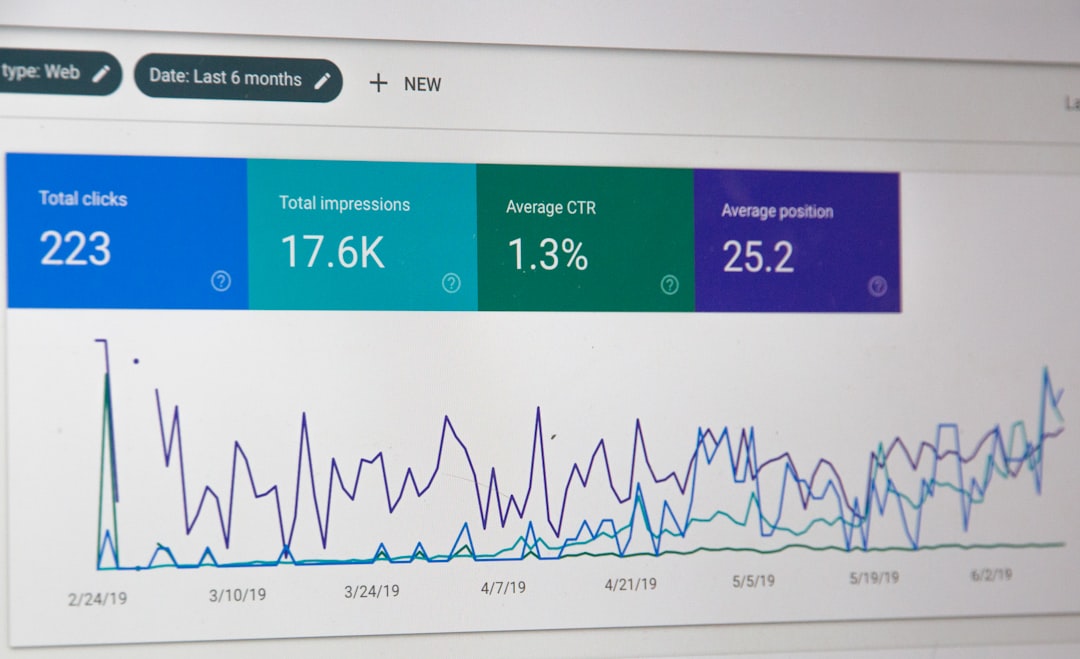
ChatGPT should not replace proper analytics tools, but it can explain patterns, frame questions, and turn raw findings into readable summaries. Never paste confidential data unless your company policy allows it.
Act as a data analyst.
Review the following data summary:
[paste data, table, or metrics]

Explain:
1. The main trend
2. Possible causes
3. Outliers or unusual changes
4. Business impact
5. Recommended next checks
6. A plain English summary for non technical stakeholders

Do not invent data. If the evidence is weak, say so.
Best use: sales reports, campaign results, churn summaries, support ticket themes, and monthly KPI reviews.
Template 6: SOP and process documentation
Standard operating procedures are often written too late. By then, the person who understands the process is busy or leaving the role. This template helps capture repeatable steps before knowledge slips away.
Act as an operations documentation specialist.
Turn this process description into a clear SOP:
[paste rough notes]

Include:
1. Purpose
2. Scope
3. Required tools or access
4. Step by step instructions
5. Common mistakes
6. Quality checklist
7. Escalation path
Use numbered steps and plain language.
This works well for onboarding, finance tasks, customer support workflows, content publishing, and approval processes.
Template 7: Decision memo
When a choice affects budget, timeline, hiring, or customers, use a decision memo. It keeps opinions from taking over the room.
Act as a strategy advisor.
Create a decision memo for this decision: [decision].
Context: [background].
Options: [list options].
Constraints: [budget, time, people, risk].
Evaluation criteria: [cost, speed, quality, risk, customer impact].

Return:
1. Recommended option
2. Short rationale
3. Pros and cons table
4. Main risks
5. Mitigation steps
6. Final decision question for leadership
Best use: vendor selection, tool changes, hiring plans, pricing changes, and project scope tradeoffs.
How to customize any ChatGPT template
Do not treat templates as scripts carved in stone. Treat them as starting points. The more closely they match your real work, the better the result.
- Add your audience: A board update should not sound like a team chat.
- Set length limits: Say 150 words, one page, or 10 bullets.
- Request structure: Tables are useful for tasks, risks, options, and comparisons.
- Ban weak output: Ask it to avoid filler, guesses, and unsupported claims.
- Ask for questions first: For complex tasks, tell ChatGPT to ask clarifying questions before answering.
A simple improvement is to add this line to most prompts: “If any required information is missing, list the missing items before producing the final answer.” That one sentence can prevent confident but flawed output.
Quality control matters
ChatGPT can draft quickly, but people remain responsible for the final work. Check facts. Confirm numbers. Remove sensitive information. Match the tone to your organization. For legal, medical, financial, or HR decisions, get qualified review.
Expect to waste time on cleanup if your prompt asks for too much at once. Split heavy work into stages. First ask for an outline. Then a draft. Then a critique. Then a final version. This produces better work than one giant prompt.
A simple prompt library structure
Store your best templates where your team can find them. A shared document, internal wiki, or project management board is enough. Create categories such as Email, Meetings, Reports, Analysis, Planning, and Operations.
For each template, include:
- The prompt
- Best use case
- Required inputs
- Example output
- Owner or reviewer
- Last updated date
The real value of ChatGPT templates is consistency. They help teams write faster, think more clearly, and reduce repeated effort. Start with five templates for your most common tasks. Improve them each week based on real results. Small prompt upgrades can remove hours of avoidable work every month.