

Shopping for software can feel like picking cereal in a giant supermarket. So many boxes. So many promises. So many “smart” features. This Conexi review keeps things simple. We will look at what Conexi does, who it is for, how pricing usually works, and which alternatives are worth a peek.
TLDR: Conexi is a business tool that helps teams manage contacts, conversations, tasks, and customer relationships in one place. It is best for teams that want less chaos and more organized follow-up. Pricing may depend on the plan, team size, and features, so you should check the latest price before buying. Good alternatives include HubSpot, Zoho CRM, Pipedrive, Freshsales, and monday sales CRM.
What Is Conexi?
Conexi is a platform built to help businesses stay connected with people. That can mean leads, customers, partners, or internal team members. The main idea is simple. Keep customer data, messages, tasks, and follow-ups in one clear workspace.
Think of it like a digital command center. Instead of jumping between spreadsheets, email tabs, sticky notes, and “wait, who called this person?” moments, Conexi aims to bring things together.
For small teams, this can be a big deal. Many businesses lose sales because they forget to follow up. Or they do follow up, but too late. Or three people contact the same customer at once. Awkward. Conexi is designed to reduce that mess.
It can be useful for sales teams, service teams, consultants, agencies, and local businesses. If your work depends on relationships, tracking conversations matters.
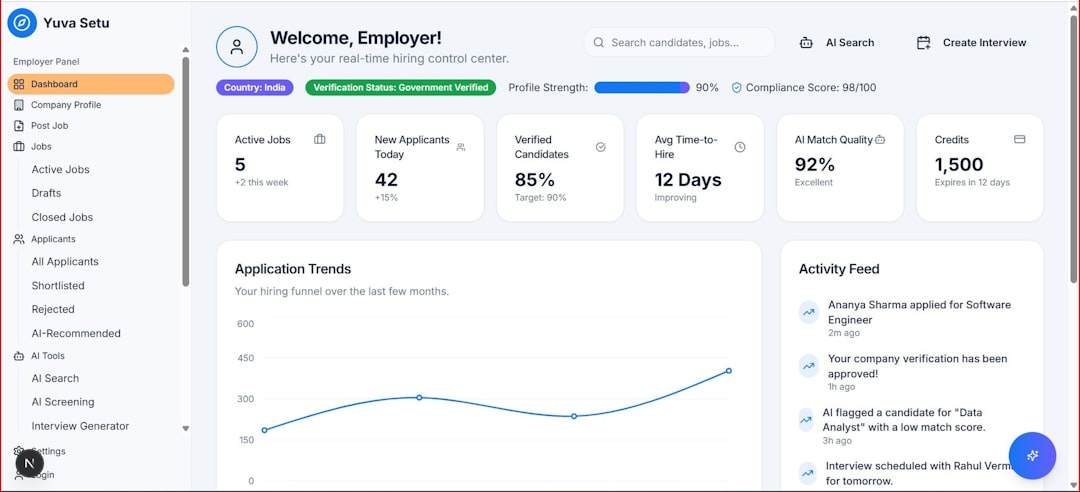
Main Features of Conexi
Let’s break down the main features in plain English. No jargon parade. No robot fog.
1. Contact Management
Contact management is the heart of tools like Conexi. You can store names, phone numbers, emails, company details, notes, and history. This helps your team know who each person is and what happened before.
That means fewer mystery calls. It also means better customer service. When a person contacts you, you can see their details fast. You do not need to ask the same questions again and again.
- Store customer details in one place.
- Add notes after calls or meetings.
- Track past messages and activities.
- Segment contacts by status, type, or interest.
2. Pipeline and Deal Tracking
If Conexi is being used for sales, pipeline tracking is very useful. A pipeline shows where each lead or deal is in the process. For example, a lead may be new, contacted, qualified, proposed, won, or lost.
This is helpful because sales can get messy. A visual pipeline makes it easier to see what needs attention. You can spot stuck deals. You can see which prospects need a nudge. You can also see what your team is working on.
It is like a scoreboard for sales, but with fewer whistles.
3. Task and Follow-Up Reminders
Follow-up is where deals are often won. Or lost. Conexi may help by letting you create tasks, reminders, and deadlines.
For example, you can set a reminder to call a lead next Tuesday. Or send a proposal tomorrow. Or check in with a customer after onboarding. Simple reminders can save real money.
- Call reminders.
- Email reminders.
- Meeting tasks.
- Customer check-ins.
- Internal team tasks.
4. Team Collaboration
Good teamwork needs clear communication. Conexi can help teams share notes, assign tasks, and see customer history. This is great when multiple people handle the same account.
For example, a salesperson may close a deal. Then a support person takes over. If the notes are clear, the handoff is smooth. The customer does not feel like they were tossed into a maze.
That is the magic word: smooth.
5. Communication Tracking
Many customer relationship tools let you track emails, calls, messages, or meetings. Conexi may offer similar communication tracking depending on the setup and integrations available.
This matters because conversations are the story of the customer. Without that story, your team is guessing. With it, your team can respond with context.
Customers like that. Nobody wants to explain the same problem five times.
6. Reports and Analytics
Reports help you answer basic business questions. How many leads came in this month? How many deals closed? Who followed up? Which stage has the most delays?
Conexi may include dashboards or reports to help track performance. This is useful for owners and managers. It is also useful for team members who want to improve.
Reports do not have to be scary. They are just business mirrors. Sometimes they show good news. Sometimes they show spinach in your teeth.
7. Integrations
Most teams already use other tools. Email. Calendars. Forms. Messaging apps. Payment tools. Maybe even spreadsheets, because spreadsheets are basically business duct tape.
A good platform should connect with your existing tools. Conexi may support direct integrations, third-party connectors, or manual imports. Before signing up, check what integrations are supported.
Ask these questions:
- Does it connect with your email?
- Does it sync with your calendar?
- Can you import contacts easily?
- Can you export your data?
- Does it work with your website forms?
Conexi Pricing
Now for the big question. How much does Conexi cost?
Pricing for tools like Conexi can vary. It may depend on the number of users, features, storage, integrations, support level, and billing cycle. Some platforms offer monthly plans. Some offer annual discounts. Some have custom pricing for larger teams.
If Conexi does not show clear public pricing, you may need to request a quote or book a demo. This is common with business software. Not always fun. But common.
Common Pricing Factors
- Number of users: More team members usually means a higher cost.
- Feature access: Advanced automation or reporting may cost more.
- Contact limits: Some plans limit how many contacts you can store.
- Integrations: Premium integrations may be included only in higher plans.
- Support: Faster or dedicated support may cost extra.
- Billing cycle: Annual billing may be cheaper than monthly billing.
How to Judge the Price
Do not look at the price alone. Look at the value. A cheap tool is not cheap if nobody uses it. An expensive tool is not expensive if it saves many hours and helps close more deals.
Ask yourself:
- Will this save time every week?
- Will it reduce missed follow-ups?
- Will it help the team stay organized?
- Will it improve customer experience?
- Can the team learn it quickly?
If the answer is yes, the tool may be worth it. If the answer is “maybe, but everyone will ignore it,” be careful. Software that sits unused is just a digital paperweight.
Pros of Conexi
Conexi has several possible strengths, especially for teams that want a simpler way to manage relationships.
- Centralized customer data: Everything is easier when information is in one place.
- Better follow-up: Tasks and reminders can help prevent lost opportunities.
- Team visibility: Everyone can see what is happening with a contact or deal.
- Cleaner workflows: A structured system beats random notes and memory games.
- Useful for growing teams: It can help create repeatable processes.
Cons of Conexi
No tool is perfect. Even the shiny ones have fingerprints.
- Pricing may not be obvious: You may need to contact the company for current pricing.
- Setup takes time: Importing contacts and building workflows can require effort.
- Team adoption matters: The tool only works if people actually use it.
- Feature depth may vary: Some teams may need more advanced CRM or automation tools.
- Integrations should be checked: Make sure it connects with your existing software.
Who Is Conexi Best For?
Conexi is best for teams that want a clearer way to manage contacts and communication. It fits businesses that rely on calls, messages, meetings, leads, and repeat follow-up.
It may be a good match for:
- Small businesses.
- Sales teams.
- Service providers.
- Consultants.
- Agencies.
- Local businesses.
- Growing teams that need better organization.
It may not be ideal for teams that need very advanced enterprise features. Large companies may need deeper customization, complex permissions, advanced reporting, or heavy automation.

Best Conexi Alternatives
It is smart to compare options before buying. Here are some strong alternatives to Conexi.
1. HubSpot CRM
HubSpot CRM is one of the most popular CRM tools. It has a generous free plan and many paid upgrades. It is good for sales, marketing, customer service, and automation.
Best for: Teams that want a powerful CRM with room to grow.
Watch out for: Paid plans can become expensive as you add advanced features.
2. Zoho CRM
Zoho CRM is a flexible and affordable option. It works well for small and mid-sized teams. It also connects with many other Zoho apps.
Best for: Budget-conscious teams that want lots of features.
Watch out for: The interface can feel busy at first.
3. Pipedrive
Pipedrive is built around sales pipelines. It is simple, visual, and easy to use. Sales teams often like it because it keeps deals front and center.
Best for: Sales teams that want clean pipeline tracking.
Watch out for: Some marketing or support features may require add-ons.
4. Freshsales
Freshsales is part of the Freshworks family. It offers CRM features, contact management, deal tracking, and automation. It can be a good balance of features and price.
Best for: Teams that want sales tools with built-in communication features.
Watch out for: Some advanced features may sit in higher-tier plans.
5. monday sales CRM
monday sales CRM is very visual. It is based on boards, columns, and workflows. It is flexible and can be adapted for sales, projects, and operations.
Best for: Teams that like visual workflows and customization.
Watch out for: It may need setup time to match your process.
Conexi vs Alternatives
Choose Conexi if you want a focused tool for managing customer connections and team follow-up. It may be especially useful if its workflow matches how your business already works.
Choose HubSpot if you want a big ecosystem. Choose Zoho CRM if you want strong value. Choose Pipedrive if sales pipeline tracking is your main focus. Choose Freshsales if you want built-in sales communication tools. Choose monday sales CRM if you love visual boards and flexible workflows.
The best choice is not always the most famous one. It is the one your team will use every day without groaning.
Final Verdict
Conexi is worth considering if your business needs a simpler way to manage contacts, conversations, tasks, and follow-ups. It can help reduce confusion and make customer relationships easier to handle.
Before you choose it, check the current pricing, available features, integrations, and support options. If possible, test it with real data. Add a few contacts. Create a task. Move a deal through the pipeline. Invite a teammate. See how it feels.
If it feels easy, clear, and useful, that is a great sign. If it feels like homework wearing a software costume, keep looking.
In the end, Conexi is not just about storing names and notes. It is about helping your team remember people, respond faster, and work with less chaos. And honestly, less chaos sounds pretty nice.